Lenovo IdeaPad 4G 14Q8C05 Windows on ARM laptop review
Lenovo IdeaPad 4G and 5G models are available only in some regions or even select countries. ThinkPad X13s with a newer Snapdragon SoC is more widely available though.
Lenovo IdeaPad 4G and 5G models are available only in some regions or even select countries. ThinkPad X13s with a newer Snapdragon SoC is more widely available though.
Specification - IdeaPad 4G 14Q8C05 (82KE000JGE)
- CPU: Qualcomm Snapdragon 8c (SC8180) - 4+4 Kryo 490 cores running up to 2.45/1.8 GHz (4 ARM Cortex-A76 performance and 4 ARM Cortex-A55 efficiency cores)
- iGPU: Adreno 675 / 680
- Memory: 8GB LPDDR4x soldered, not user upgradable
- Storage: 2280 M.2 PCIe 3.0 x4 slot; 256GB stock SSD
- Display: 14", 1080p, IPS, mat, 300 nits, anti-glare 100% sRGB
- Network: WiFi 5ac, Bluetooth 5.0, Qualcomm QGM8180X 4G LTE CAT20 modem
- I/O: 1x USB 3.2 Gen 1 (Always On), 2x USB-C 3.2 Gen 2 (support data transfer, Power Delivery 3.0, and DisplayPort™ 1.4), 1x Nano-SIM card slot, 1x Headphone/microphone combo jack (3.5mm)
- Webcam: 720p, IR
- Battery: 51Wh, battery life - 20h local video playback at 150 nits. 45W USB-C charger
- Weight: 1.2kg, aluminium top, PC+ABS bottom
Pricing and availability issues
Lenovo IdeaPad 4G and 5G models are available only in some regions or even select countries. ThinkPad X13s with a newer Snapdragon SoC is more widely available though.
When it comes to pricing we get into some sort of chaos. I bought my unit for 251 EUR from notebooksbilliger.de while it was discounted by 57%! As of the time of writing this review, IdeaPad 4G is sold out in that store and the list price is 699 EUR. Other stores list it at 361 EUR (Idealo), and 845 EUR (Kaufland) but mostly sold out.
The slightly updated IdeaPad 5G models are priced from 499 EUR up to 800-900 EUR range. Both models see a big price range and German stores seem to be having frequent sales of them where the prices go way down like in my case.

Qualcomm smaller and bigger refreshes
Qualcomm likes to refresh their SoCs with minor tweaks, modem changes, and the like. Snapdragon 8c, cx gen 1 and 2 are just small clock and modem changes. 8cx gen 3 is pretty much a new SoC, superior to the previous ones of its generation.
- Snapdragon 8c: TSMC 7nm , Cortex-A76 and Cortex-A55 cores (2.45, 1.8GHz)
- Snapdragon 8cx: clock bump of 8c, 2.84, 1.8GHz
- Microsoft SQ 1: clock bump of Snapdragon 8cx
- Snapdragon 8cx gen 2: clock bump of 8cx (3.15/1.8 GHz)
- Microsoft SQ 2: slight clock bump of 8cx gen 2
- Snapdragon 8cx gen 3: 5nm LPE Samsung, 1 Kryo 680 prime core (3 GHz, Cortex-X1), 3 Kryo 680 Gold (2.42 GHz, Cortex-A78) and 4 Kryo Silver cores (1.8 GHz, Cortex-A55)
Look and feel of the laptop
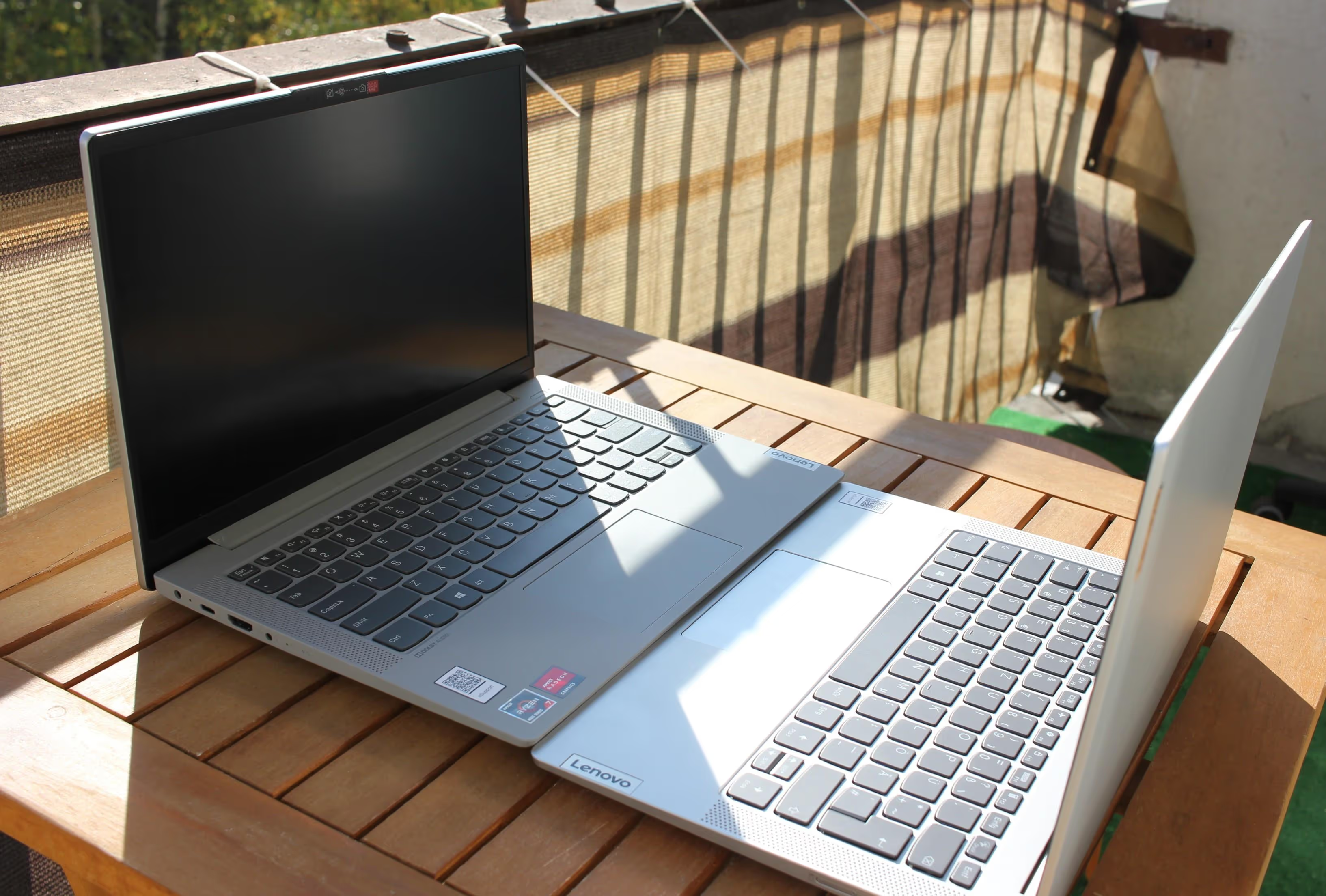
The laptop looks and feels well-built. The chassis is a mix of aluminum at the top and aluminum-alike plastic parts on the palm rest and bottom cover. The keyboard is backlighted with few levels of brightness. Compared to a similar 14" Lenovo IdeaPad 5 14ARE05 with Ryzen 4800U the typing experience is somewhat better. There is no deck flex but also it feels like there are some rubber rings/cushions around the keys to limit noise while also giving a nice typing experience.
The screen is a typical laptop mat one with a bit of graininess visible. The colors and brightness however do look good and definitely avoids cheap dim panels quite common in even premium laptops. However, this is not OLED or glossy display so you won't get that extra colors and brightness.
Speakers are pretty ok. Nothing spectacular as usual but they get the job done and are up-firing from the sides of the keyboard which is a nice plus over common down-firing from below the laptop. They can get pretty loud and then you can feel the vibrations on the palmrest which isn't ideal (unless you are vibing hard). Also at max volume, some frequencies can get clipped.
Inside the laptop
The back of the laptop is held by five Torx T4 screws which aren't your typical Philips-type screws. Once you get them out you can access the laptop components. RAM is not upgradable but the M.2 storage is. I'm planning to do a separate test with installing Windows and Linux from scratch on a new drive to see if there are no issues with that (and if you can install Linux at all).
Performance
Snapdragon 8c performance is way behind current low-power Intel or more so AMD mobile chips. On top of that, it's a 7W so a lower power class than for example Ryzen 6800U which is a 15-28W part. Snapdragon-based laptops are fanless while pretty much every AMD/Intel one will have active cooling (unless it's some low-end, low-power part).
The second problem is benchmarking on Windows on ARM itself. Most Windows applications do not have a native AARCH64 version so they run through an emulation layer which impacts performance.
For the comparison benchmarks I used two other laptops and a mac mini:
- Lenovo IdeaPad 4G 14Q8C05: Qualcomm Snapdragon 8c
- Lenovo IdeaPad 5 14ARE05: Ryzen 4800U, Vega 8. SoC power usage: 24,6W, 2x8GB 1Rx16 RAM
- HP 15-dw3000ni: i7-1165G7, Intel Xe graphics 96EU. SoC power usage: 17,2W, 2x8GB 1Rx8 RAM
- Mac Mini: M1, 16GB RAM, 8 core GPU
- Motorola moto g200: Snapdragon 888+, 8GB RAM, design similar to 8cx gen 3
Native synthetic benchmarks
Geekbench supports WoA and thus the results won't be impacted by the emulation process. It can however test only the CPU. Single-core score is around 581 while the multi-core score is around 2453. Multiple runs give very similar results and the performance does not seem to drop when on the battery power.
GFXBench is a GPU synthetic benchmark with support for WoA. The test is rather simple but at the same time capable of testing weaker integrated graphics. On Windows DX12 version was used, Vulkan on the Motorola phone, and Metal on Apple M1.
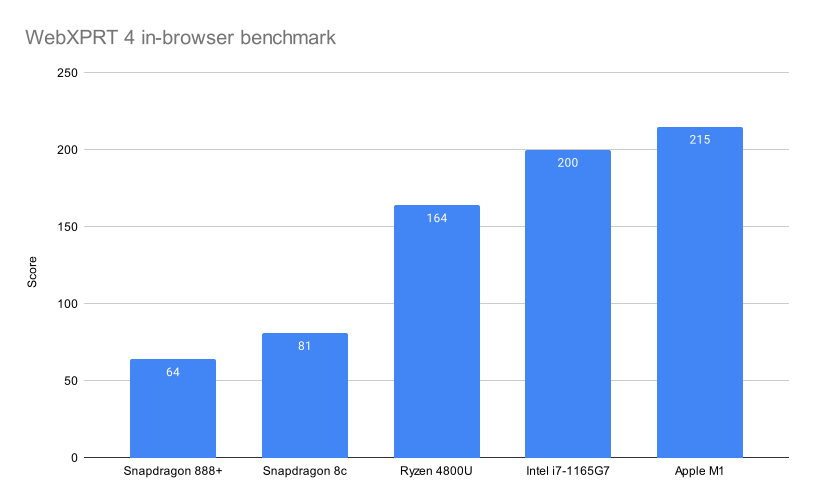
WebXPRT 4 is an in-browser benchmark testing performance in various tasks done in a browser. For Windows, the tests were done with MS Edge while on macOS Safari was used. Motorola was running Android and used the Chrome browser.
Snapdragon 888+ in a phone shows that the newer SoC design as well as Samsung 5nm LPE node can give good CPU performance however thermals and/or storage (or Android) hold it back when it comes to GPU or in-browser benchmarks. 888+ is similar to 8cx gen 3 available now in a few laptops as well as in Microsoft nettop from Project Volterra.
Snapdragon 8c offers half single and pretty much half multi-core performance as 8-core Ryzen 4800U or quad-core Intel 1165G7. Those chips use more power, and use an active cooling solution but also deliver when it comes to a laptop chip. Without discounts on the ARM laptops, those two are also cheaper (and replaced by newer chips as well). So it all comes down to if you explicitly want a fanless device for your specific use cases it can handle (and when Android or Apple tablets, Chromebooks fail).
Native games benchmarks
You can check my World of Warcraft benchmarks for this laptop as this game does have a native AARCH64 version. Overall the performance is way behind Intel Xe or AMD Vega 8 integrated graphics, not to mention Apple M1. Yet on low settings, it can handle WoW Classic and some light activities in the current expansion while being a fanless device.
Emulated games benchmarks
Windows 10 allows WoA devices to emulate and run 32-bit x86 applications. Windows 11 expanded that to 64-bit x86 applications. Obviously, this is only a partial solution as it does take a toll on the performance of a given application.
Final Fantasy XIV benchmark crashes when trying to run it. Skyrim does run although some UI elements behave weirdly (like wait/sleep timer self-scrolls to max value constantly).
The original 32-bit Skyrim at 1080p low settings reaches around 44 FPS (widefield view of the marshes near Morthal). The 64-bit Skyrim Special Edition reaches only 22 FPS (while Ryzen 4800U gets 39 FPS). There are some differences in how 32 and 64-bit applications are emulated on WoA but also the Skyrim versions likely differ in settings or assets used at the lowest quality preset. I'll try to add some more similar tests later on.
Which applications work or do not work?
I'm planning a follow-up article where I will go over popular Windows applications and check/test if and how they work on this WoA device. It's rather obvious that a lot of software vendors do not provide a native ARM version of their applications. The amount of devices and userbase is really small and the chips on their own provide very limited performances whereas Apple designs offered noticeable performance uplifts over their Intel predecessors.
IdeaPad 4G 14Q8C05 conclusions
The laptop as a device is really good. I like the keyboard and overall experience when using the device. I got it because it was really cheap and I wanted to experiment with a somewhat modern WoA device as well as have a lightweight device to carry around to work as a personal PC rather than the main workstation PC. If it had slightly more capabilities (more RAM, a bit better CPU) and would run Linux it could even be my main device. Even when Microsoft released their Project Volterra
nettop with Snapdragon 8cx gen 3 a lot of people were asking does it run Linux?
- as it has the RAM, the storage, and a better CPU. Even though Windows has WSL - Windows Subsystem for Linux, I'm still not there to switch to Windows and use that.
class MemeGenerator:
  def __init__(self, image_path, caption):
      self.image_path = image_path
      self.caption = caption

  def generate(self):
      image = self._get_image_object()
      # image operations here
      return image

  def _get_image_object(self):
      return PIL.Image.open(self.image_path)
The laptop as a device is really good. I like the keyboard and overall experience when using the device. I got it because it was really cheap and I wanted to experiment with a somewhat modern WoA device as well as have a lightweight device to carry around to work as a personal PC rather than the main workstation PC. If it had slightly more capabilities (more RAM, a bit better CPU) and would run Linux it could even be my main device. Even when Microsoft released their Project Volterra
nettop with Snapdragon 8cx gen 3 a lot of people were asking does it run Linux?
- as it has the RAM, the storage, and a better CPU. Even though Windows has WSL - Windows Subsystem for Linux, I'm still not there to switch to Windows and use that.